

In a world where mobile applications are a key channel for sales and customer service, large organisations face a fundamental question: how to effectively develop and maintain products on Android and iOS without doubling costs, labour and the risk of discrepancies? Kotlin Multiplatform (KMP) is the answer that organisations seeking a pragmatic way to scale delivery are increasingly choosing – especially when applications already exist and complete rewriting is not an option.
This article presents a strategic perspective on KMP for CTOs, Heads of Mobile, Product Managers and purchasing departments, where the most important factors are speed of implementation (time-to-market), cost (TCO) and predictability of results.

Key takeaways
- KMP allows you to share business logic and data between Android and iOS while maintaining a native UI on both sides.
- In enterprise KMP, it usually gives the best return in areas such as: shopping cart and checkout (rules), promotions, loyalty, API integrations, offline/synchronisation, business validations.
- 30-50% savings in development time – according to market practice, sharing business logic can reduce the implementation time of new features by up to half.
- KMP is an SDK, not a UI framework – it is a set of tools that allows code to be shared across platforms while maintaining full control over the presentation layer.
- KMP is a stable solution: JetBrains announced Kotlin Multiplatform as Stable in November 2023
- Google supports Kotlin as a ‘Kotlin-first’ approach for Android and publishes materials on Kotlin Multiplatform, including scenarios for code sharing with iOS
- KMP is used in production by large organisations – examples include McDonald’s, Careem, Netflix, Philips, VMware, Memrise, Quizlet, and 9GAG
What is Kotlin Multiplatform and how does it work in practice?
Kotlin Multiplatform is a software development kit (SDK) developed by JetBrains that enables companies to build and develop applications for Android and iOS more efficiently at the same time, without sacrificing native quality. Instead of maintaining two completely independent code bases, teams can share key business logic – such as data handling, business rules, and backend communication – while retaining full control over the native user interface on each platform.
Kotlin Multiplatform enables developers to write a single codebase that works across multiple platforms.
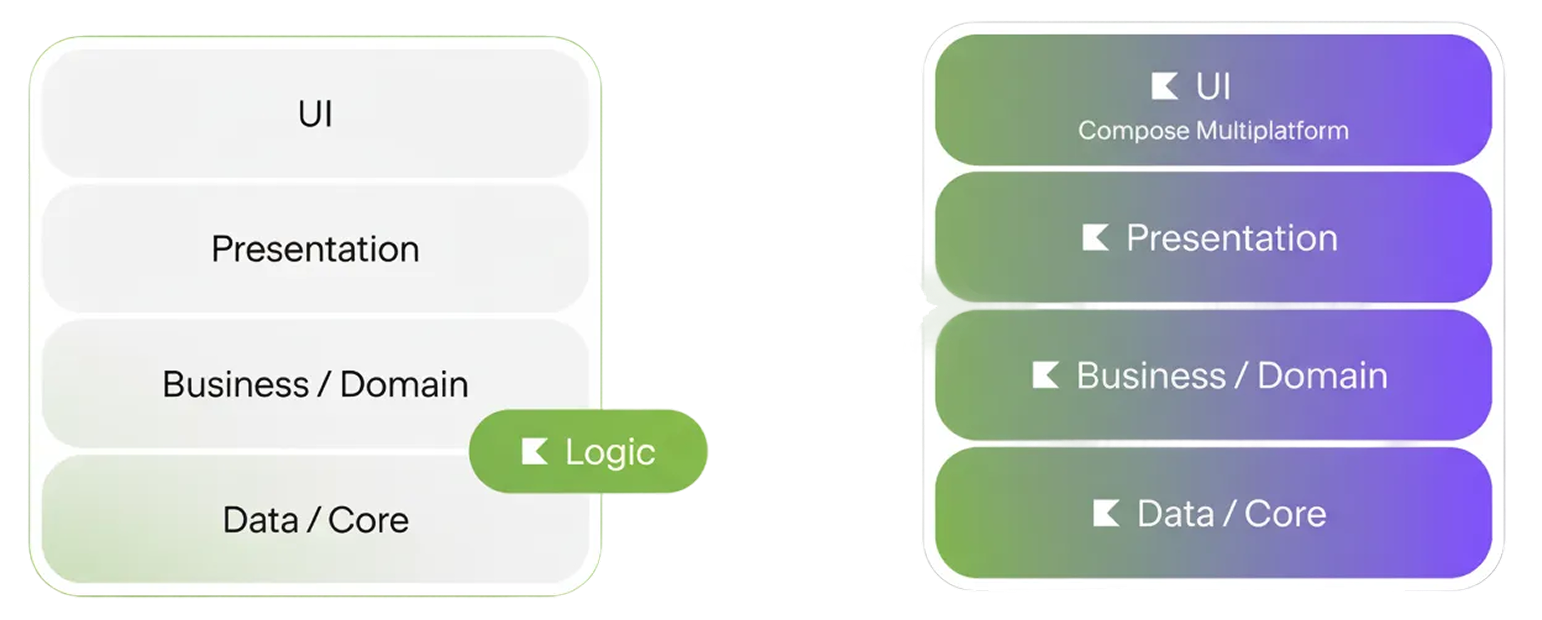
Left: sharing only a small part of the business logic. Right: sharing all layers, from data to user interface. Kotlin Multiplatform is flexible enough to handle both situations.
How does it work in practice?
Kotlin Multiplatform differs fundamentally from classic cross-platform frameworks such as Flutter. It is not a UI rendering engine or runtime environment – it is a compilation tool that allows the same Kotlin code to be executed on different target platforms by compiling it into native binaries.
In practice, this means:
- Faster time to market – business logic written once works on both platforms
- Lower risk of discrepancies between application versions on different systems
- Lower long-term maintenance costs – less code duplication means fewer places requiring updates
The implementation of Kotlin Multiplatform will enable faster changes and better management of application development on both platforms.
Each platform continues to use its own proven UI technologies (SwiftUI/UIKit for iOS, Jetpack Compose/XML for Android), eliminating compromises in performance and user experience – key considerations in business applications and large-scale products.
Mechanism expect/actual
The heart of KMP interoperability is the expect/actual mechanism. In the common module, you define abstract APIs using the expect keyword – for example, a function that generates a unique identifier. In platform modules, you provide specific implementations with the actual keyword: on Android, you can use UUID.randomUUID(), on iOS, the native NSUUID().uuidString.
What typically goes into the common code:
- REST/GraphQL support and communication with the backend
- Authorisation logic and session management
- Data models and validations
- Caching and state management
- Business flows and domain rules
What remains native:
- User interface (Jetpack Compose, SwiftUI, UIKit)
- Complex animations, screen transitions, and gesture support
- Specific platform features (ARKit, Android Auto)
- Access to equipment (camera, Bluetooth, GPS, sensors)
- Security and biometrics (Keychain/Keystore, FaceID)
Compose Multiplatform – UI sharing option
Although KMP does not enforce UI sharing, Compose Multiplatform is a framework developed by JetBrains that enables UI logic to be shared across platforms. It currently provides stable support for Android, desktop (Windows, macOS, Linux) and web, with support for iOS in development. For enterprise organisations, this means an additional option in the future, although in 2026, the most common approach remains native UI with shared business logic. Compose Multiplatform is easy to implement compared to traditional cross-platform solutions, allowing you to get started faster and reduce configuration complexity.
Kotlin Multiplatform is not a technological revolution, but rather a strategic optimisation: it allows teams to work in parallel, scale product development, and gradually implement shared code without having to rebuild the entire architecture. This solution is particularly attractive for organisations that want to increase delivery efficiency while maintaining high quality and platform independence.
Why should you consider KMP?
In 2026, enterprise organisations operate in an environment where competitive advantage increasingly comes from the speed of delivery and the ability to scale digital products. Kotlin Multiplatform addresses these challenges by offering a mobile application development model that combines cost efficiency with native user experience quality.
Faster time-to-market without compromising on UI
One of the biggest challenges in enterprise organisations is synchronising Android and iOS application development. Maintaining two code bases in parallel often leads to delays in feature releases, inconsistencies between platforms, and increased workload for QA teams.
Kotlin Multiplatform allows you to share key business logic across platforms, which reduces development time by 30-50% according to the experience of companies such as Memrise and VMware. In addition, KMP ensures consistent business logic across both platforms, eliminating discrepancies in application behaviour and speeding up the implementation of changes.
In practice, this means:
- Shorter implementation time for new features – business logic written once
- Easier to maintain consistency of products across platforms
- Faster response to market and regulatory changes
- More predictable release cycles – fewer discrepancies in platform readiness
Optimisation of TCO (Total Cost of Ownership)
In an enterprise environment, the cost of software development is only part of the total expenditure. The biggest costs arise from long-term maintenance, development, and team scaling.
Kotlin Multiplatform impacts the Total Cost of Ownership in several key areas:
- Reduction of duplication of work – shared business logic reduces the workload involved in implementing and maintaining functions.
- Lower quality maintenance costs – fewer discrepancies between platforms means fewer errors and shorter testing processes.
- Better utilisation of team resources – easier scaling of competencies and greater flexibility in the allocation of specialists
- Longer code lifespan – shared components are easier to develop and adapt to new products or digital channels
However, it is worth bearing in mind the potential limitations that may arise when implementing multi-platform solutions such as Kotlin Multiplatform Mobile. These limitations may relate to both implementation costs and functionality – for example, not all native platform features may be available, or their implementation may require additional work.
In organisations with an extensive portfolio of mobile applications, even partial sharing of logic can bring noticeable savings within 2-3 years.

Reducing the risk of vendor lock-in
Enterprise organisations are increasingly avoiding strategies that rely heavily on a single technology provider or specific framework.
Kotlin Multiplatform fits into this trend because:
- Does not replace native platform technologies – acts as a shared layer
- Allows you to maintain the independence of development Android and iOS
- Enables gradual implementation without the need for full migration of existing applications
- It is based on an open ecosystem and widely used technologies (Kotlin is an open source language).
This gives organisations greater control over product architecture and allows them to respond flexibly to technological or strategic changes.
Strategic alignment with enterprise realities
Kotlin Multiplatform is particularly well suited to the needs of organisations that develop multiple products simultaneously, operate in regulated environments, or require high operational stability. The ability to implement gradually, limit the risks of transformation, and improve team efficiency makes KMP a solution that supports long-term software development strategy.

How to get started with Kotlin Multiplatform in existing enterprise applications
Kotlin Multiplatform is currently one of the most pragmatic ways to achieve “shared code” in organisations that already have mature mobile applications and do not want to rewrite them from scratch. The greatest value of KMP in enterprise is not in flashy demos, but in incremental cost reduction and delivery time reduction where Android and iOS must behave identically: business logic, validations, rules, data formatting, API communication, cache, analytics. Before implementing Kotlin Multiplatform, it is worth carefully analysing your business needs so that the decision is informed and well thought out.
Below is a step-by-step approach that typically works in real-world environments (with teams, processes, security, and technical debt). After implementing KMP, it is necessary to continuously monitor and analyse application performance, which allows for quick responses to changing user needs.
1. Start with the question “what hurts the most” – not with technology
In existing applications , the most common problem is:
- Double implementation of the same logic on iOS and Android
- Functional differences between platforms (different behaviour of the same function)
- Delays in releases because “the second platform is not ready yet”
- Repeated errors in validations and edge cases
- The cost of maintaining integration with the backend (two implementations = twice as many points of failure)
Before implementing Kotlin Multiplatform, it is necessary to conduct a detailed analysis of the areas that most require optimisation.
KMP makes sense when you can identify areas where shared code will reduce risk and labour intensity. If you want to “standardise the UI”, this is not usually the best first step in an enterprise (especially in products with a large number of screens and an established design system).
2. Select the first small use case with a high RO
The safest take-off areas are those that:
- They have little dependence on the UI.
- They are individually testable.
- They are important for business (frequently changed)
- Today, they are duplicated across platforms.
It is worth starting with a small pilot project, which will allow the team to learn the tools and verify the assumptions before full implementation.
Examples of good “first modules”:
- API communication layer + model mapping (without UI)
- Form validation and business rules (e.g. shopping cart validation, promotions)
- Authorisation/token mechanisms (use with caution, but ROI can be high)
- Cache, offline, data synchronisation
- Calculations: prices, promotions, limits, scoring, taxes
Example: McDonald’s used KMP to share business logic in its Global Mobile App, maintaining a native UI for optimal UX. Memrise chose KMP to share logic, network communication, and persistence layer, maintaining an offline experience without moving logic to the backend.

3. The “Strangler Fig” approach: stick it on, don’t rewrite i
The most business-safe migration model is the Strangler Fig pattern – adding KMP as:
- Separate library/module
- Integrated into existing applications
- Launched in parallel with the existing implementation (if necessary)
- Taking responsibility bit by bit
It is worth noting that using proven multi-platform libraries minimises the risk during migration to KMP.
This enables:
- Do not block the product roadmap
- Minimise the risk of regression
- Deliver iteratively and measure the effects
- Retain the ability to roll back quickly
4. Define boundaries: what goes to KMP and what remains nativ
In enterprise, a simple rule of division of responsibility applies:
Common (KMP):
- Business logic and validation rules
- Integracja z backendem (API clients, repositories)
- Data transformations and mapping
- Cache/replication/synchronisation mechanisms – the application can retrieve the most frequently used data directly from the cache, which speeds up its operation.
- Part of analytics and business events
- Calculations and algorithms
Native (iOS/Android):
- UI i UX (SwiftUI, Jetpack Compose, UIKit, XML)
- Platform-specific integrations (Apple Pay, Google Pay, biometrics)
- Access to unusual system functions (often faster and more stable natively)
- Performance-critical UI i animacje
This division usually provides the best compromise: business consistency + no compromises in the interface.
5. Build competence and governanc
Implementing KMP in an enterprise requires:
- Strong Kotlin/Android skills as a foundation
- Architectural support that understands the division into layers
- Mature collaboration with iOS (Swift) on the integration side
- Standards and guidelines for teams
- CI/CD adapted to multi-platform builds
- Governance model – who decides what goes into the shared layer?

When might KMP not be the best choice?
To be fair, we must present scenarios in which Kotlin Multiplatform may not be the optimal solution. In some cases, alternative technological approaches may prove to be better, such as fully native application development or other cross-platform frameworks (Flutter, React Native), depending on the specific requirements of the project.
KMP is not the best choice when:
FAQ: Kotlin Multiplatform in large organisations
Is KMP a stable and secure technological solution?
Yes. Kotlin Multiplatform is stable and ready for use in production environments – JetBrains announced its Stable status in November 2023. In addition, there are numerous public case studies of production implementations in enterprise organisations such as McDonald’s, Careem, Netflix, Philips, VMware, Memrise, and Quizlet.
How does KMP affect UX, performance, and accessibility?
If the UI remains native, you do not compromise on approaches that render the UI “above the platform”. Users get a 100% native experience on their platform. It is crucial to clearly define the contracts between the common layer and the UI and to clearly divide responsibilities. KMP does not negatively affect application performance because the shared code is compiled into native machine code. Users get a full native experience on their platform.
What are the advantages of Kotlin Multiplatform?
The advantages of Kotlin Multiplatform include:
- Reducing application development time
- Lower costs
- Better cooperation between Android and iOS developers
- Greater consistency between platforms
- Flexibility in choosing the amount of shared code
- Support for gradual implementation, enabling teams to improve existing native applications without having to completely rewrite them.
What are the disadvantages of Kotlin Multiplatform?
The disadvantages include:
- Limited library support compared to mature frameworks
- No common user interface logic for iOS (the user interface must be built natively)
- Certain limitations in Swift/Objective-C interoperability
- Translation issues and additional complexity may increase the time required to develop iOS applications.
What kind of applications is Kotlin Multiplatform best suited for?
Kotlin Multiplatform is best suited for applications that need to run on multiple platforms (Android, iOS, desktop, web) while maintaining common logic. This is particularly useful when extending an existing Android application to iOS, where only specific modules need to be shared, or when combining common business logic with native implementations for features such as AR, ML, or rich animations.
Do I need to rewrite my application?
No. You can start small by sharing a module or function and integrating it into your existing application. KMP is designed for gradual implementation, making it easy to introduce cross-platform code step by step.
The future of mobile development in Enterprise
In light of the dynamic changes and growing demands of the mobile market in 2026, Kotlin Multiplatform appears not as another transitional technology, but as a key strategy for mobile application development in the enterprise environment. The ability to effectively scale delivery, reduce costs and accelerate time-to-market, while maintaining the impeccable quality of the native user experience, is the answer to the fundamental challenges faced by CTOs, Heads of Mobile and Product Managers.
Kotlin Multiplatform is a strategic tool for those who view mobile application development not only as a technological task, but as a key element of competitive advantage and continuous innovation. It is a conscious choice that allows you to build more efficient teams, more consistent products, and more resilient architectures, preparing organisations for future digital challenges.

Kotlin Multiplatform: Efficiency is a strategic choice, not a compromis
Developing Android and iOS applications in an enterprise environment is not only a matter of technology, but above all of strategic resource management. We will help you understand how Kotlin Multiplatform eliminates duplication of work, reduces development costs by 30-50 per cent, and speeds up the delivery of functionality, while ensuring a native user experience.
Author
Marcin Stasiak
Head of Tech Solutions
A solutions architect and full-stack developer with 13 years of experience who translates complex technology into real value for users and marketing teams. He focuses on ensuring that even the most advanced systems work efficiently, intuitively and in line with business needs. He is also interested in the topic of teal organisations and their impact on the working environment.

